
You're manually revoking course access when someone pauses their subscription. Then manually restoring it when they resume. Manually sending "we miss you" emails. Manually updating tags in your CRM. Manually, manually, manually.
And when you have 50 active subscribers, it's tedious. When you have 200, it's overwhelming. When you're trying to scale to 500 or 1,000, manual subscription management becomes the bottleneck that prevents growth.
We see this pattern too often with subscription businesses: brilliant product, strong market fit, but operations held together with spreadsheets and manual tasks. The business can't scale because the owner is trapped in operational quicksand.
ThriveCart's latest updates change this equation. These aren't flashy features designed for marketing demos. They're operational enablers that let your systems handle what you've been doing manually—freeing you to focus on growth instead of maintenance.
In this article, we're going to walk through ThriveCart's new subscription automation features—including pause/resume workflows, Stripe compliance alerts, and Pro+ templates—so that you can stop managing subscriptions manually and start scaling your business with confidence. This is part of my ongoing series on ThriveCart's feature updates, where I break down not just what's new, but how to actually integrate these tools into your operations. Too many business owners either miss these updates entirely or don't realize the strategic value they unlock. A tool is just a tool until you know how to use it properly.
A tool is just a tool until you know how to use it properly.
Last week I covered ThriveCart's business intelligence updates—tools that help you make smarter decisions with better data. This week is about operational excellence: automation that works while you sleep.
The Subscription Lifecycle Problem You've Been Solving Manually
Here's the scenario I encounter constantly: A customer pauses their membership because they're going on vacation, having a slow business month, or need to pause payments temporarily. You want to:
- Immediately revoke their course or membership access
- Send them a personalized "see you soon" message
- Tag them as "paused" in your CRM for future segmentation
- Keep them on certain email lists but remove them from member-only communications
- Track how long they've been paused
- When they resume: reverse all of that instantly
Right now, you're doing this manually. Or you're not doing it at all, which means paused subscribers still have full access (creating billing issues) or they get abruptly cut off without communication (creating customer service problems).
Neither option scales. Both create operational stress.
ThriveCart Pause/Resume Automation: Your New Operations Manager
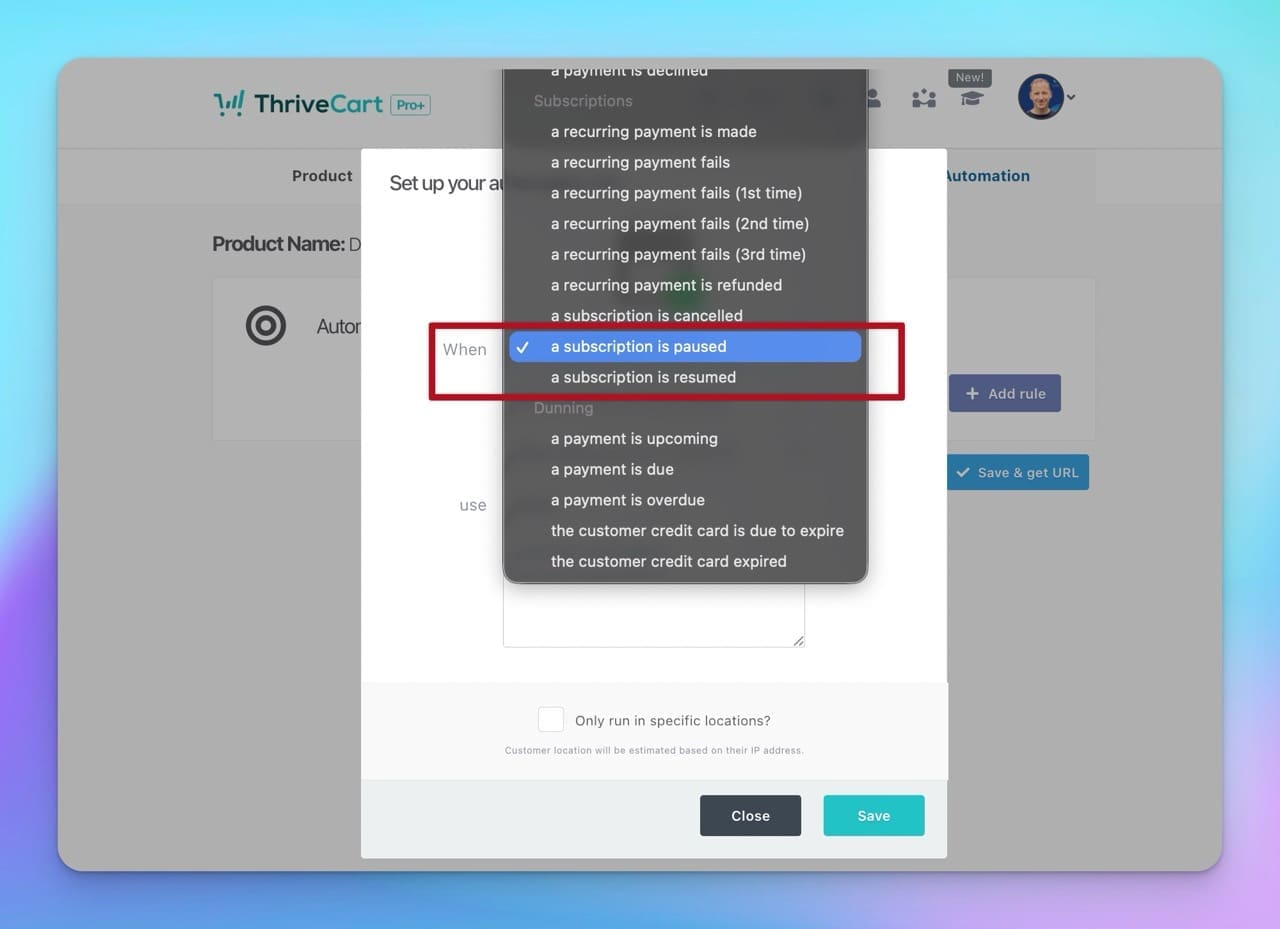
The new automation rules for paused and resumed subscriptions solve this systematically. Inside your Behavior Rules editor, you now have two new triggers:
- "A subscription is paused"
- "A subscription is resumed"
Just like any other automation event, you can connect these triggers to actions across your entire business system. Let me show you what this looks like in practice.
Use Case 1: The Course Creator with Flexible Payment Plans
Let's say you're selling a 12-week program for $497. You offer flexible payment plans, and you've learned that allowing pauses actually increases lifetime customer value—people stay subscribed longer when they have flexibility.
But managing paused subscribers manually was killing you. Every pause meant logging into your LMS, revoking access, updating your CRM, sending a manual email. Then you calculate and set reminders to track the length of the pause. When they resumed, you'd do it all again in reverse.
Here's your new workflow automation:
When subscription pauses:
- Revoke course access (integration with your LMS - easiest if you're using ThriveCart Learn+)
- Send personalized email: "Taking a break? We'll be here when you're ready. Your progress is saved."
- Add CRM tag: "Subscription-Paused"
- Remove from: Weekly member emails
- Keep on: Company newsletter (stay connected)
- Trigger: 30-day check-in sequence ("Ready to resume?")
When subscription resumes:
- Restore full course access (automatic LMS integration)
- Send welcome back email: "Welcome back! Pick up right where you left off."
- Remove CRM tag: "Subscription-Paused"
- Add CRM tag: "Subscription-Active-Resumed" (segment for retention focus)
- Add to: Weekly member emails
- Extend course deadline by the pause duration (fair access period)
The business impact: You just turned a manual 15-30 minute task (twice per subscriber) into a zero-touch automated workflow. At 50 pause/resume cycles per month, that's 25+ hours saved. At 200 cycles, you've saved 100+ hours of operational work.
More importantly, your customers get consistent, professional communication. Your retention improves because pausing is friction-free. And you can confidently offer payment flexibility as a competitive advantage.
Use Case 2: The Membership Site with Seasonal Subscribers
If you run a business community that sees predictable pause patterns: summer vacation season, December holidays, tax season. You probably dread these periods because managing 30-50 pauses at once is operationally crushing.
This challenge is different from the course creator—you want paused members to stay connected to the community (for retention) but not have access to premium resources or live events.
Your pause automation strategy:
When subscription pauses:
- Revoke: Premium resource access, live event invitations, private forum access
- Maintain: Public community access, newsletter subscription, alumni network
- Send: "Stay connected while you're paused" email with alumni benefits
- Add to: Paused member Slack channel (light community touch)
- CRM workflow: 60-day re-engagement sequence with seasonal resume prompts
When subscription resumes:
- Restore: All premium access
- Send: "Welcome back!" email with what's new since pause
- Trigger: Onboarding refresh (new features, recent highlights)
- Update CRM: Engagement scoring boost (resumed members are high-intent)
- Personal outreach: Community manager welcome message
The strategic advantage: They turned seasonal churn into planned pauses. Instead of losing 40% of subscribers in summer, they see 30% pause (then resume in September). Their annual retention jumped 22% because pause-and-return is easier than cancel-and-resubscribe.
Use Case 3: The SaaS Product with Payment Issue Grace
Software subscription businesses face a different challenge: distinguishing between "chose to pause" versus "payment failed and we paused them" versus "we're giving a grace period."
Their tiered automation approach:
Customer-initiated pause:
- Grace period: Full access for 7 days, then revoke
- Communication: Understanding, supportive
- Win-back sequence: Value reminders, use case ideas
Payment-failed pause:
- Grace period: Limited access for 14 days
- Communication: Problem-solving, help-focused
- Action: Payment method update prompts, support offers
Manual admin pause (special circumstances):
- Full access maintained
- Communication: Custom (handled separately)
- CRM flag: High-touch customer service
The result: Every pause type gets appropriate treatment. Customer experience improves because communication matches context. Support burden drops because automation handles the standard cases.
Want to see these subscription automation features in action? Explore ThriveCart here to discover how these workflows can transform your subscription business operations.
Bonus Update: Proactive Compliance with Stripe Alerts
While we're talking about operational peace of mind, ThriveCart also added Stripe Connect+ notification banners directly in your dashboard.
Here's the problem this solves: Stripe requires certain merchants to verify business information periodically—tax details, ID verification, address confirmation. If you miss these alerts, Stripe can pause your payouts or decline charges. You might not realize there's an issue until money stops flowing.
Previously, you'd only see these alerts if you logged into your Stripe dashboard (which, let's be honest, you probably don't check daily). Now, ThriveCart embeds Stripe's notification banner directly in your merchant dashboard.
How it works:
- When Stripe needs updated information, the banner appears automatically
- Click the banner → goes directly to Stripe Connect+ verification flow
- Complete the requirement → banner disappears
- Your dashboard stays clean until action is needed
Why this matters:
- Prevent disruption before it happens: No surprise payout holds
- Save time: Don't need to monitor multiple dashboards
- Reduce stress: System alerts you proactively
- Stay compliant: Never miss a requirement
This is the kind of operational excellence that separates scalable businesses from fragile ones: systems that prevent problems instead of reacting to them.
The Quick Win: Digital Marketing Template for Agencies
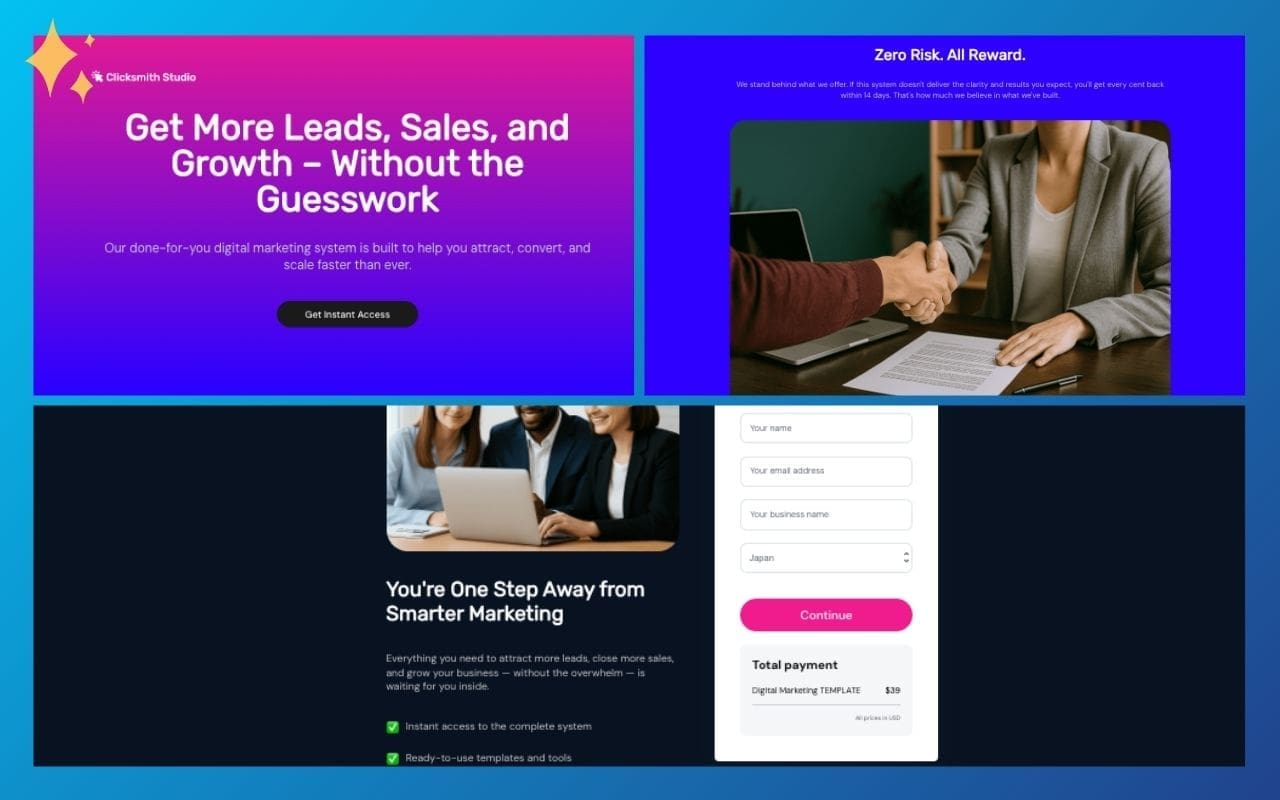
ThriveCart Pro+ users with Stripe Connect also got a new Digital Marketing template set—a long-form sales page and matching checkout specifically designed for agencies, consultants, and marketing service providers.
This isn't a generic template with placeholders. It's a professionally-crafted page that understands how marketing services sell. Here's what makes it effective:
Smart Conversion Architecture:
- Immediate social proof above the fold - Three client testimonials with names and company details visible before any pitch
- Problem-agitate-solve structure - Opens with the frustration ("Struggling to Get Consistent Results?"), acknowledges pain points, then presents the solution
- Strategic bonus stacking - Three high-value bonuses (landing page templates, ad copy swipe file, email sequences) positioned to increase perceived value
- Risk-reversal guarantee - 14-day money-back guarantee prominently featured to reduce purchase friction
- FAQ section that handles objections - Addresses experience level, customization, implementation speed, and results timeline
Professional Design Elements:
- Clean, modern layout with generous white space (signals premium positioning)
- Client testimonial cards with attributions throughout the page (builds credibility at decision points)
- "What's Inside" feature grid that makes the offer tangible
- Bonus section with visual hierarchy that feels like added value, not filler
For Your Target Market:
If you're selling marketing retainers, agency services, high-ticket coaching, or done-for-you solutions, this template speaks your customer's language. The copy framework and visual structure are built around the specific buying psychology of business owners investing in marketing help—skeptical from past disappointments but eager for a system that works.
The template removes 80% of the page-building work while maintaining the strategic elements that convert. You're not starting from a blank canvas—you're customizing a conversion-tested framework that already understands your market.
How Automation and Intelligence Work Together
Here's where this week's updates connect with last week's business intelligence features. If you're running a subscription business with ThriveCart, understanding how ThriveCart's 2025 reporting updates work alongside these automation features creates a powerful operational system. And for those just getting started with ThriveCart, seeing this systems approach helps you understand the platform's full potential.
Intelligence tells you WHAT to do. The Top Sellers report shows which products drive profit. Subscription cancellation tracking reveals where you're losing customers.
Automation tells your system HOW to do it. Pause/resume workflows execute your retention strategy automatically. Stripe alerts prevent problems before they cost you money.
Together, they create operational leverage: smart decisions + automated execution = scalable growth.
Think about it:
- Your cancellation data reveals that 70% of churn comes from failed payments
- You build an automation: payment-failed pause → trigger payment update sequence
- Your retention improves without adding manual work
This is systems thinking in action. This is how businesses scale from 100 to 1,000 to 10,000 customers without proportionally scaling operational headcount.
Why This Matters for Your Business Right Now
We're heading into Q4, which means:
- Budget planning season: Customers evaluate subscriptions and cut costs
- Holiday pauses: Predictable seasonal pause spike
- Year-end goals: You need operations that support growth, not hinder it
Setting up these automations now means you enter 2026 with systems that scale. You're not manually managing pauses during your busiest season. You're not discovering Stripe compliance issues during holiday closures. You're operating with confidence instead of stress.
If you're running a subscription business, course platform, or membership site, ThriveCart subscription automation transforms how you operate. Manual tasks become automated workflows. Operational stress becomes systematic efficiency. Growth bottlenecks become scaling advantages.
The Bottom Line: Operational Freedom
Here's what I tell clients when we're designing their operational systems: Your business should run on rails, not on your constant attention. The goal isn't to work harder—it's to build systems that work while you focus on strategy, growth, and the work only you can do.
ThriveCart's pause/resume automation, Stripe compliance alerts, and professional templates move you closer to that goal. These aren't incremental improvements. They're operational enablers that let subscription businesses scale with confidence.
Ready to implement these automation features? Get started with ThriveCart here to access pause/resume workflows, Stripe Connect+ alerts, and Pro+ templates. The platform is built for businesses that want powerful automation without technical complexity.
Already using ThriveCart but need help designing the right workflows for your business? Schedule a quick strategy call to talk about your specific operational challenges. I help subscription businesses build automated systems that scale, not just configure tools that exist.
Frequently Asked Questions
What is ThriveCart subscription automation?
ThriveCart subscription automation uses behavior-based triggers to automatically execute actions when subscribers pause or resume their plans. This includes revoking/restoring access, sending communications, updating CRM tags, and triggering follow-up sequences—all without manual intervention. You can integrate your favorite CRM, Email Marketing Platform or no-code automation app for smooth automations.
How do I set up pause and resume automation in ThriveCart?
Inside your ThriveCart product's Behavior Rules editor, you'll find two new triggers: "A subscription is paused" and "A subscription is resumed." Connect these triggers to actions like access control, email sequences, CRM updates, and integrations with your course platform or membership site. The automation executes automatically whenever the trigger event occurs.
Can ThriveCart pause resume and subscription features work with my existing tools?
Yes, ThriveCart's automation integrates with most major platforms including learning management systems (LMS), CRM tools, email marketing platforms, and membership site software. The behavior rules can trigger actions across your entire tech stack through native integrations or webhooks.
What's the difference between subscription pause and cancellation?
A pause is temporary—the customer intends to resume later and typically expects their progress/access to be saved. A cancellation is permanent. ThriveCart workflow automation lets you treat these differently: paused subscribers might stay on certain communications and receive win-back sequences, while cancelled subscribers follow a different offboarding path. WIth resume automations, the customer doesn't need to sign up again from the start.
Is the Stripe compliance banner available to all ThriveCart users?
The Stripe Connect+ notification banner is available to all ThriveCart users who have Stripe Connect+ enabled. It automatically displays in your ThriveCart dashboard when Stripe requires verification or updated information, helping you stay compliant and avoid payout disruptions.







0 Comments