A COMPLETE NOTION SEO STRATEGY DASHBOARD
SEO Command Center
Stop Guessing. Start Ranking.
Your Notion SEO Strategy Dashboard Is Here.
You've read the blog posts. Watched the tutorials. Maybe started a spreadsheet of title tags three months ago. And yet, your SEO still feels like loose threads. Not because you haven't tried. Because you don't have a system.
The SEO Command Center is a Notion SEO template that turns scattered spreadsheets and SEO anxiety into a clear, repeatable modern SEO strategy. Build topical authority, manage content with semantic SEO principles, and get the peace of mind that your website actually works.
Available in two editions: SEO Command Center for core optimization workflows, or SEO Command Center Pro for authority tracking, search intent mapping, and advanced strategic tools.
Build with intention. Draft, edit, and finalize your content in the SEO Command Center so it's SEO-ready before it hits your website.
You're Not "Bad at SEO." You Need a Notion SEO Strategy System.
Here's the truth: most SEO problems are organization problems.
You already know title tags matter. You know meta descriptions affect click-through rates. You know your content should match what people search for. What you don't have is a place to put that knowledge into action, consistently, page by page, month after month.
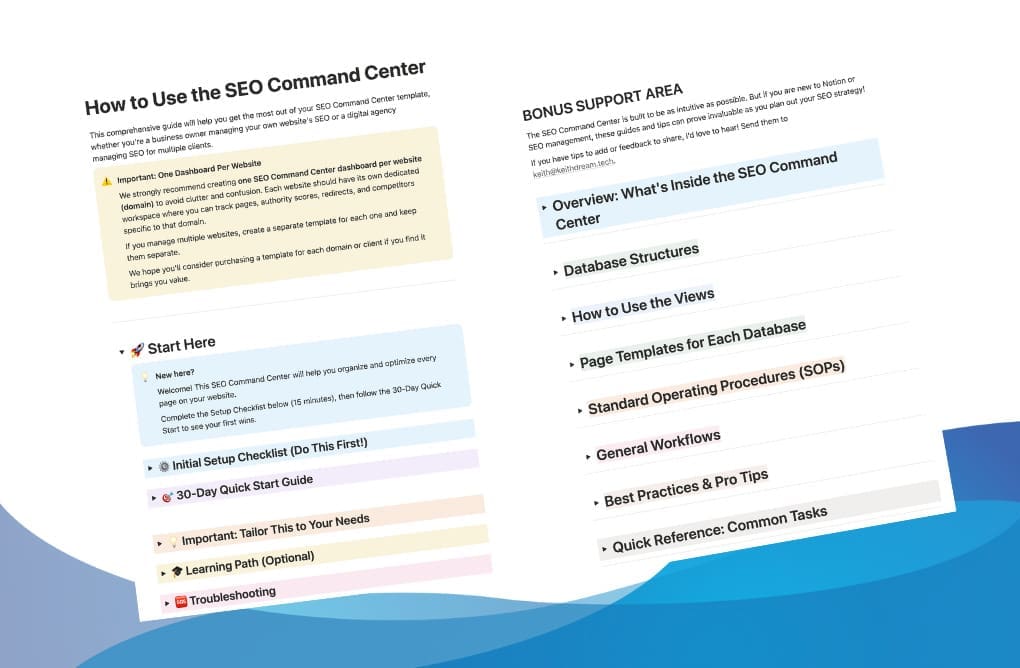
The SEO Command Center is your guided operating system. A Notion SEO dashboard with step-by-step guides, clear definitions, and tutorials built right in so you never have to wonder "what do I do next?" again.
That shift from "I should work on my SEO" to "I know exactly what needs attention this week" is what the Command Center delivers.
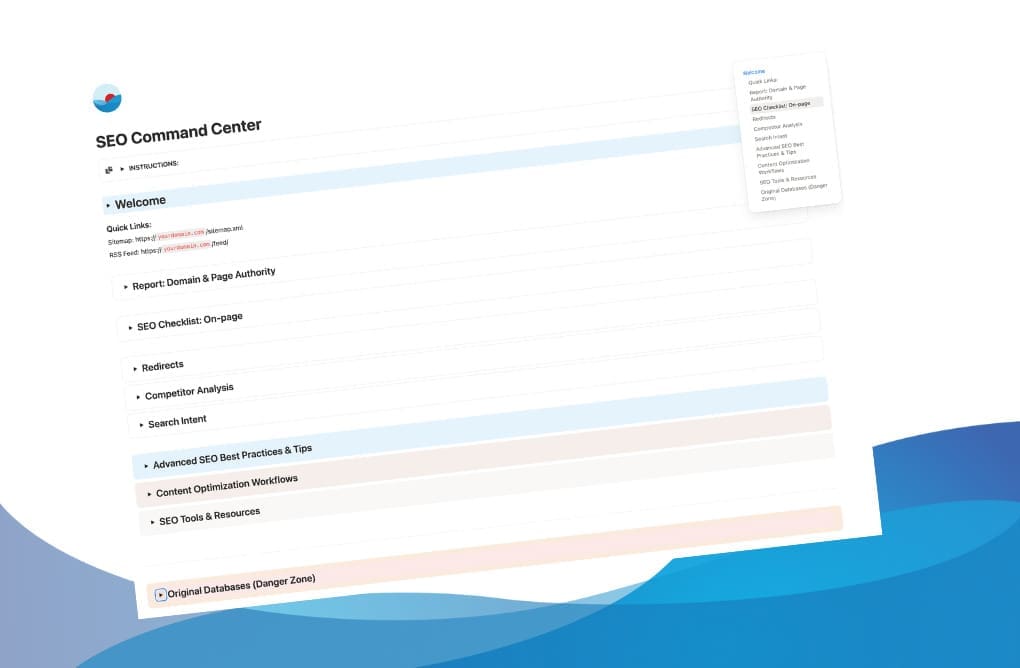
Build with intention. Draft, edit, and finalize your page or post in your SEO Command Center so it's SEO-ready before you add it to your website..
See the Full SEO Command Center in Action
What you get, built-in:
Custom page templates with content-specific checklists for blog posts, landing pages, company, and services pages
Centralized SEO Checklist database with status tracking and all essential elements at a glance
Built-in search intent management with definitions and examples for matching content to searcher needs
Redirect management with implementation guidance to protect link equity
Complete on-page optimization checklist tracking all essential ranking factors
Review dates and reminders so you always know it needs attention
SEO learning guides covering modern SEO strategy, topical authority SEO, and SEO entities
Complete SOPs and ready-made workflows for common scenarios
What you leave behind:
Broad checklists that don't apply to your content
Scattered tasks across random docs, sticky notes, and spreadsheets
Confusion about writing to meet your reader's intent
Anxiety about breaking your site when you move or rename pages
Guessing if your content is actually "optimized"
Losing track of which pages need updating
Choose Your Edition: Standard or Pro
Both editions give you a complete optimization system. The difference is depth and scale.
The question isn't whether you need a system, it's which edition fits where you are right now.
SEO Command Center: Managing your own site and want core functionality without complexity. Optimize pages, track competitors, manage redirects.
SEO Command Center Pro: Tracking metrics across multiple sites, running client engagements, or need authority rankings and search intent mapping.
What's in Both Editions
On-Page SEO Checklist - Optimization status tracking for every page
Redirect Management - 301/302 tracking with implementation guidance
Competitor Analysis - Systematic competitor research
All 4 AI Workflows - Content optimization, competitor outranking, media optimization
Page Templates - Blog, landing page, service, homepage, about, standard (Pro adds product)
30-Day Quick Start Guide - Clear daily actions for your first month
Learning Guides - SEO entities, semantic SEO best practices, workflow SOPs
SEO Tools Resource List - Curated free and paid tools by category
What Pro Adds
Authority Rankings Database - Track Domain Authority and Page Authority over time with visual charts
Search Intent Database - Map content to Informational, Commercial, Transactional, Navigational intent
Advanced Competitor Analysis - 12 properties including DA, Organic Keywords, Backlinks, Content Frequency
Authority Tracking Guide - Step-by-step SOP for monitoring authority
SEO Health Dashboard - Centralized metrics and KPIs
*Standard Edition includes a simplified competitor analysis (7 core properties)
Complete Feature Comparison
Here's everything included in each edition, side by side:
| Feature | Standard | Pro |
|---|---|---|
| DATABASES | ||
| Total Databases | 3 | 7 |
| My SEO Checklist | ✓ | ✓ |
| Competitor Analysis | ✓ | ✓ |
| Redirects | ✓ | ✓ |
| Authority Rankings | — | ✓ |
| SEO Health Dashboard | — | ✓ |
| Search Intent | — | ✓ |
| Domain/Page Authority Checkers | — | ✓ |
| PAGES & GUIDES | ||
| Total Pages | 6 | 8 |
| How to Use Guide | ✓ | ✓ (Pro version) |
| Competitor Analysis Guide | ✓ | ✓ |
| Understanding Entities in SEO | — | ✓ |
| AI SEO Checklist 1 | ✓ | ✓ |
| AI SEO Competitor Outranking Guide | ✓ | ✓ |
| AI SEO Checklist 2 | ✓ | ✓ |
| AI Website Media Architect | ✓ | ✓ |
| Track Authority Rankings Guide | — | ✓ |
| PAGE TEMPLATES | ||
| Total Templates | 6 | 7 |
| Standard Page Templates (blog, landing, services, standard, about, home) | ✓ | ✓ |
| Product Page Templates | — | ✓ |
| SEO CHECKLIST PROPERTIES | ||
| Basic Properties (status, URL, title, meta, keywords, etc.) | ✓ | ✓ |
| Optimization Checks (title, meta, URL, headings, alt text, etc.) | ✓ | ✓ |
| Domain & Page Authority (DA/PA) with Trends | — | ✓ |
| Page Speed (Mobile & Desktop) | — | ✓ |
| Search Intent (Relational) | — | ✓ |
| Authority Rankings (Relational) | — | ✓ |
| COMPETITOR ANALYSIS PROPERTIES | ||
| Total Properties | 7 | 12 |
| Core Analysis (URL, topics, strengths, areas, notes) | ✓ | ✓ |
| Advanced Metrics (DA, keywords, backlinks, content, social) | — | ✓ |
| WORKFLOWS | ||
| Total Workflows | 5 | 6 |
| Core SEO Workflows (migration, blog creation, page copy, ranking drops, content strategy) | ✓ | ✓ |
| Building Authority for Specific Page | — | ✓ |
| STANDARD OPERATING PROCEDURES (SOPs) | ||
| Total SOPs | 4 | 6 |
| Essential SOPs (adding pages, optimization, content refresh, quarterly review) | ✓ | ✓ |
| Authority Tracking SOPs (domain & page authority cadence) | — | ✓ |
| SPECIAL FEATURES | ||
| Search Intent Database (with 4 types + descriptions) | — | ✓ |
| Authority Ranking Views (including graph views) | — | ✓ |
| Agency Efficiency Tips | — | ✓ |
| Enhanced Technical SEO Content | — | ✓ |
| CONTENT OPTIMIZATION WORKFLOWS | ||
| 3-Step AI-Powered Process | ✓ | ✓ |
| Image Optimization (AI Website Media Architect) | ✓ | ✓ |
| Manual Checklist Option (non-AI) | ✓ | ✓ |
Top use cases
Solopreneurs Managing your own website SEO
Keep all your optimization tasks, keywords, and content strategy in one place.
Agency running SEO accelerators
Use status fields and authority tracking to run 6-12 month client sprints.
Who this Notion template is designed for
Whether you're a DIY business owner maintaining your own site or an agency managing client deliverables, this template gives you a simple, repeatable system to optimize pages, track competitors, and manage your content workflows. Learning Guides and Best Practices are built right into the dashboard so you can learn SEO while you work.
Pro edition users can leverage search intent mapping and authority tracking to run SEO accelerators or retainers with transparent progress reporting clients actually understand.
Which Edition Should I Choose?
SEO Command Center (Standard) is ideal for:
- Solopreneurs managing their own website optimization
- Small business owners who want to master the basics
- Anyone starting their SEO journey who needs core functionality
- Those who want a focused system without metric overload
- Budget-conscious users who need essential tools now
SEO Command Center Pro is ideal for:
- SEO practitioners tracking authority metrics
- Agencies running accelerators or retainer services with client reporting
- In-house marketers who need search intent mapping and strategic planning tools
- Anyone managing complex SEO projects with comprehensive competitor research
- Teams that want complete visibility into domain and page authority trends
Quick Decision Guide:
1. Do you need to track Domain Authority or Page Authority metrics?
2. Are you managing SEO for clients or running SEO as a service?
3. Do you need comprehensive competitor analysis with 12+ data points (backlinks, organic keywords, social presence)?
If you answered YES to any of the above, go for Pro.
If you answered NO to all, go for Standard.
A One-Time Notion SEO Template. Not Another Subscription.
You're not signing up for another monthl subscription you'll use twice and you're not getting a generic checklist written for a Fortune 500 team.
You're getting a complete SEO operating system built inside the tool you already use: Notion.
No recurring fees. No auto-renewals. Just a system that works.
About the Workspace Designer
I'm Keith Eldridge, a Notion consultant and digital strategist who transforms complex business operations into streamlined, intuitive Notion workspaces and websites.
I specialize in creating clarity from chaos, turning scattered information into organized systems that empower teams and save time.
Check out my fancy badges from Notion!



What My Clients & Colleagues Say

"Keith is very detail oriented and explains things extremely well. I could stop constantly googling complicated computer jargon, and now I have a list of actionable goals that will improve my website's functionality. This has saved me SO MUCH TIME!"

"I've benefited greatly from my discussions with Keith on website design, pricing strategies, and business optimization. His ability to simplify complex concepts and provide actionable recommendations has enhanced my online presence and helped me achieve my business goals."

"Keith has excellent knowledge and skill in all areas of digital strategy. He is truly an expert when it comes to his niche and puts the requirements and goals of his clients at the forefront of his business. I would recommend his services to any business owner wanting to grow their online presence."
What's Inside the SEO Command Center?
Nine sections work together to give you a complete SEO operating system:
1
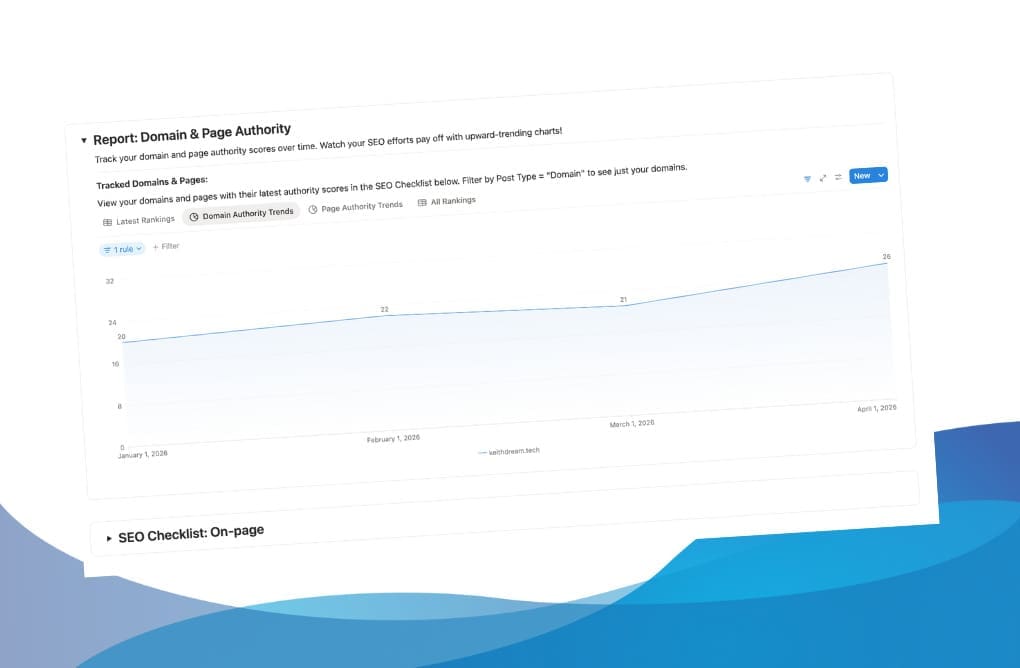
1. Domain & Page Authority Report (Pro)
Visual charts showing authority trends over time. See the impact of your SEO work.
Visual proof your SEO efforts are working.
2
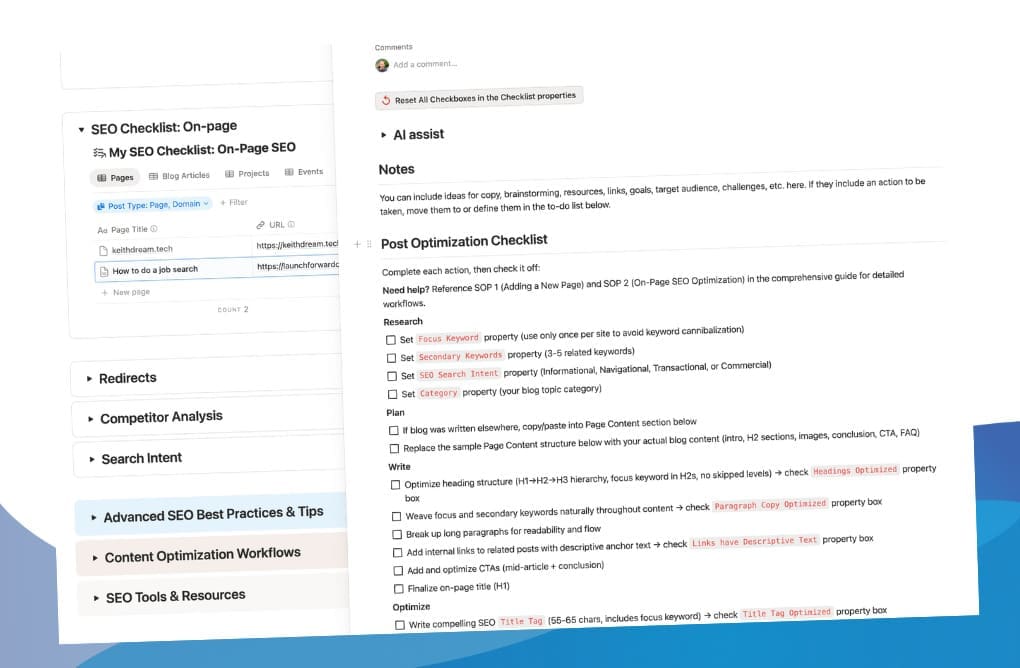
SEO Checklist: On-Page
Your central workspace. Track optimization status, completion dates, and ensure every title, meta description, and header meets best practices before publishing.
This is where your to-do lists are.
3
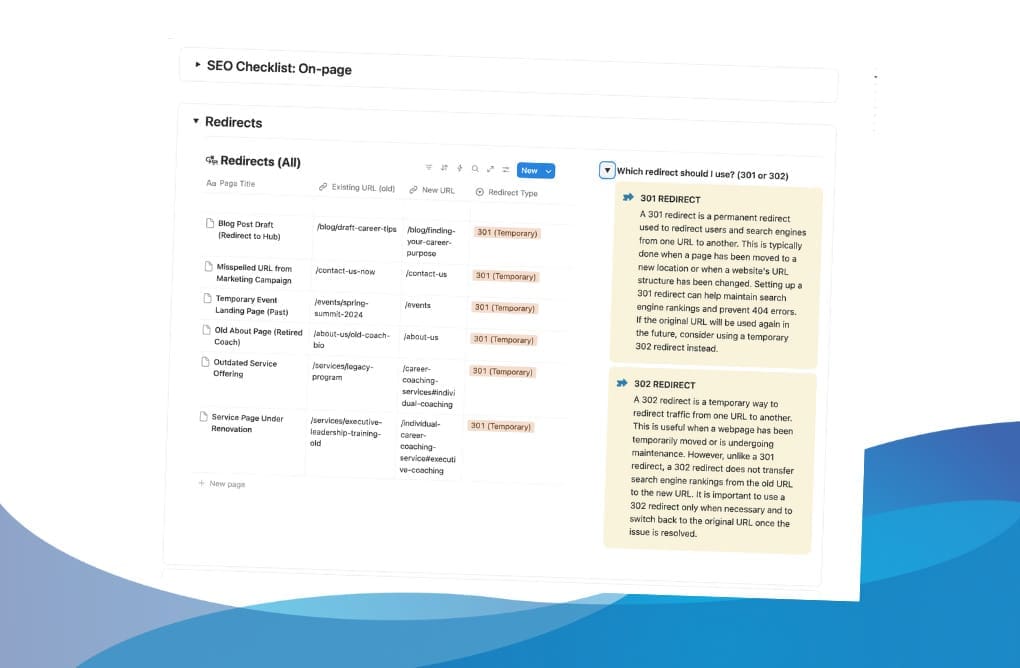
Redirects
Manage 301/302 redirects with built-in guidance. Never lose link equity when moving or renaming pages.
Quick guides help you decide the right redirect.
4
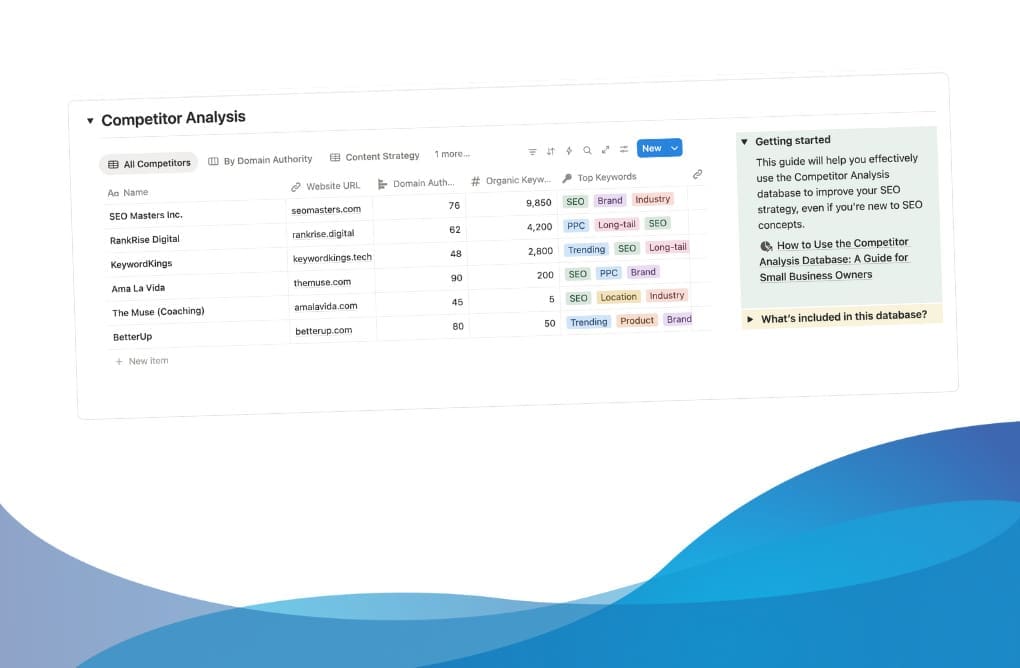
Competitor Analysis
Log Domain Authority, top keywords, content frequency, and strategic positioning systematically. Get Pro for deeper analysis.
Use simple guidelines to identify gaps and opportunities.
5
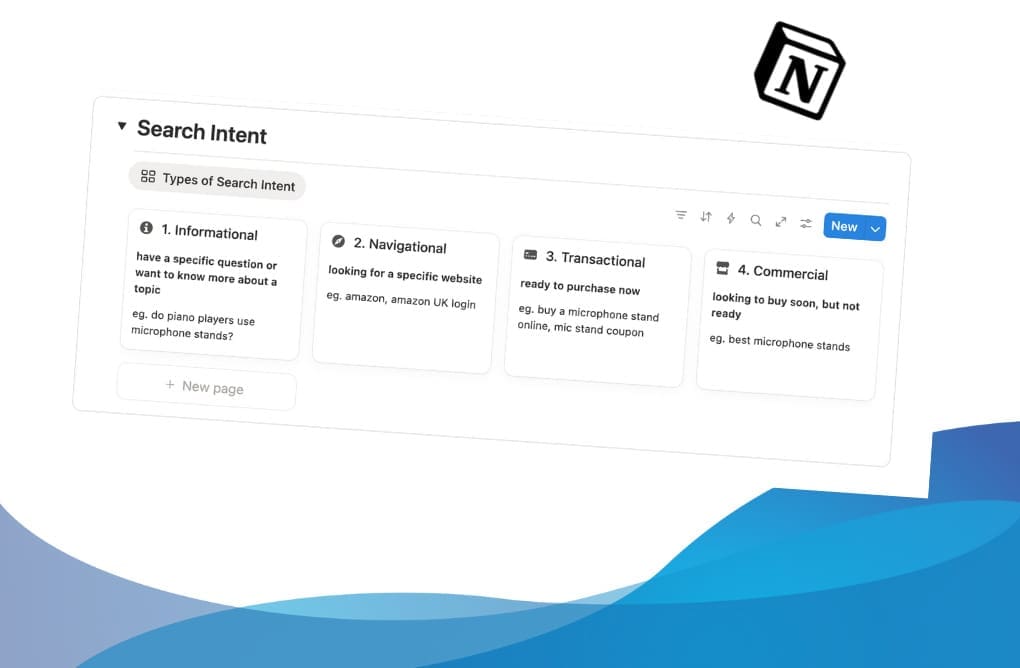
Search Intent (Pro feature)
Map content to user intent types so your content matches what searchers actually want.
Learn the four main types of search intent here.
6
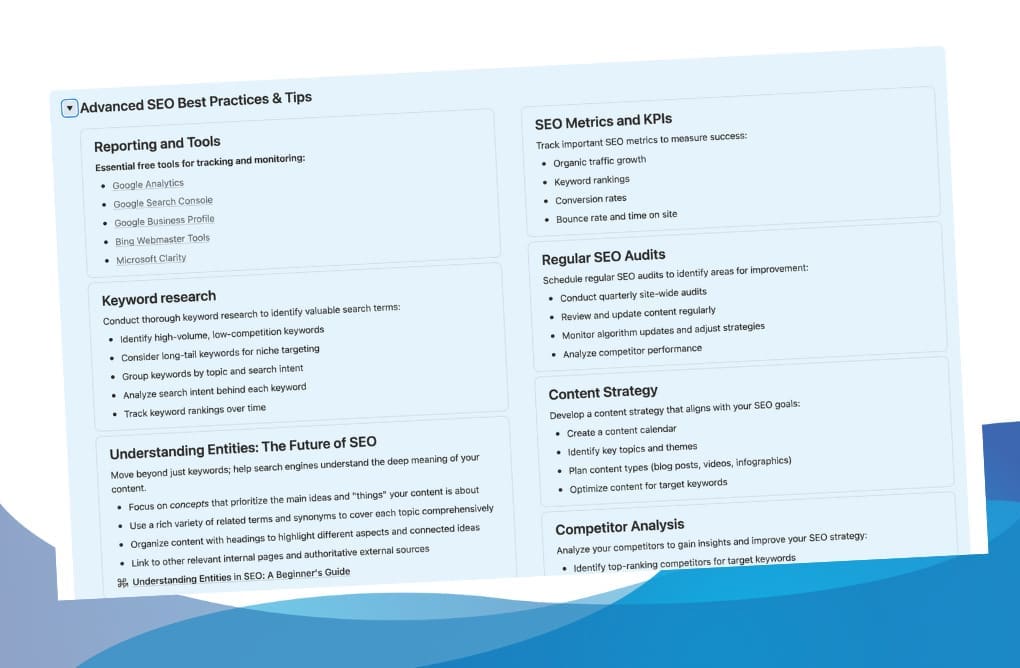
Advanced SEO Best Practices
Guides on SEO entities, semantic SEO, topical authority SEO, and modern strategies. Built into your workflow
Master advanced concepts or stick with the essentials - your choice.
7
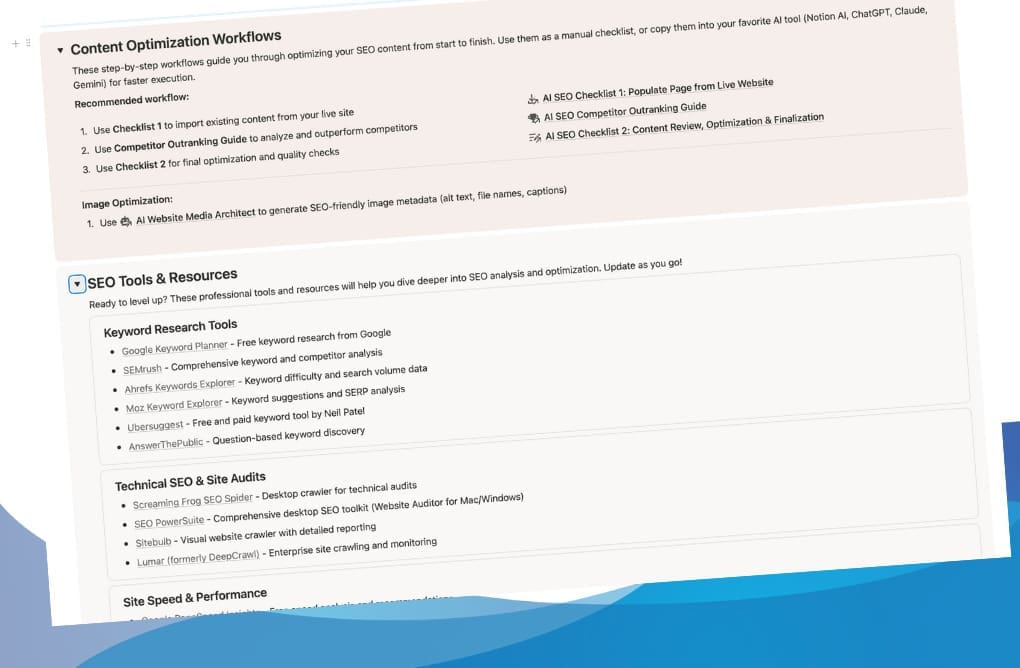
Content Optimization Workflows
SOPs for adding pages, on-page optimization, ranking drops, content refresh, and quarterly reviews
Determine the best workflow for your skill level and pace.
8
SEO Tools & Resources
Organize your favorite tools (Ahrefs, SEMrush, Search Console) for quick access alongside the Command Center
Work alongside your favorite tools, ready when you need them.
9
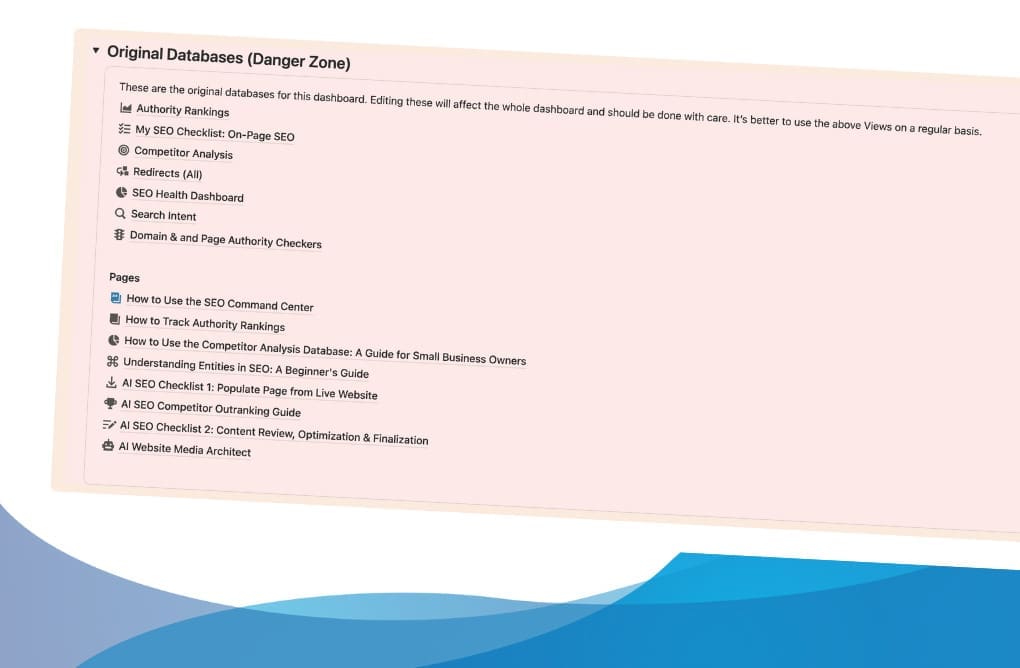
Original Databases & Pages
(Danger Zone)
Source databases that power everything above. Work from linked views in sections 1-8; originals stay intact if you accidentally delete a view
This is how I organize all my client workspaces to protect them from accidental data loss.
Important Note:
This is not a WordPress plugin or automated "fix-it" button. It's a strategic workspace. You bring the knowledge of your audience; this provides the structure, tips, and recommended tools.
Start Optimizing Today
You don't have time to build an SEO system from scratch. The Command Center includes everything to hit the ground running:
Templates for All Content Types
- Pre-filled properties
- step-by-step checklists
- AI prompts
- and real-world structure examples.
Standard: 6 templates (Blog, Homepage, Landing Page, Services/Sales, About/Company, Standard Page)
Pro adds: Product page template for e-commerce
30-Day Quick Start Guide
Your roadmap for the first month—no guesswork, just clear daily actions:
- Week 1: Build your foundation and baseline
- Week 2: Quick wins (titles, meta, alt text)
- Week 3: Content structure and internal linking
- Week 4: Build SEO habits and run your first audit
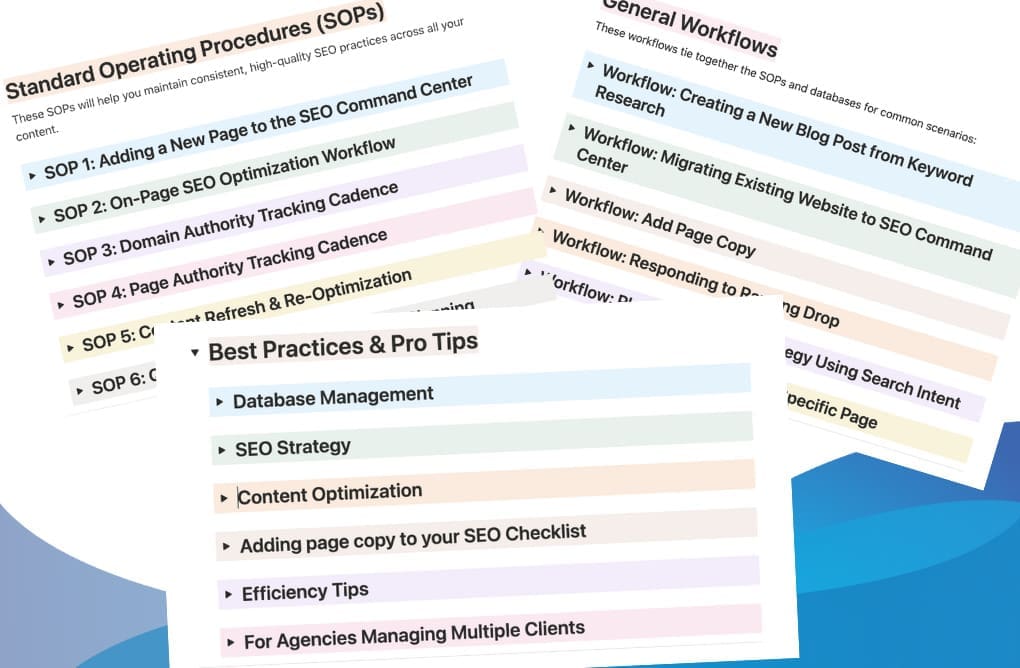
6 Standard Operating Procedures
Never wonder "what's next?" with step-by-step SOPs for:
- Adding new pages to your system
- Complete on-page optimization (7-phase workflow)
- Content refresh and re-optimization
- Quarterly SEO review and strategy planning
- Domain authority tracking cadence (Pro)
- Page authority tracking for key pages (Pro)
6 Ready-Made Workflows
Common scenarios mapped step-by-step:
- Creating blog posts from keyword research
- Migrating existing websites
- Responding to ranking drops
- Adding page copy to your database
- Building authority for specific pages (Pro)
- Planning content strategy using search intent (Pro)
AI-Powered SEO Workflows (Completely Optional)
This Notion SEO template works perfectly with or without AI. If you want AI assistance, optional workflows speed up data entry and content analysis while keeping you in control.
- Manual Mode: Follow workflows as step-by-step SOPs
- AI Mode: Use with Notion AI, ChatGPT, or Claude to accelerate research 10x
All workflows are standard Notion pages. Customize them however you like.
Your Repeatable SEO Process
Small, consistent actions add up to ranking gains. The Command Center gives you a four-step cycle:
- Capture: Add new pages and assign search intent
- Plan: Prioritize which pages need optimization
- Ship: Complete checklist items and set up redirects
- Review: Check progress, update notes, plan your next focus
Daily, weekly, or monthly. Consistency matters more than frequency.
Learn From Other Users
I collect real examples of how people customize their Notion SEO dashboards and solve SEO challenges in a regular newsletter. A space to share what's working and keep improving together.
Notion SEO Strategy Dashboard: Founders' Launch Pricing
I use dynamic pricing with five tiers. First buyers get the lowest price. As tiers fill, the price increases permanently. No fake scarcity. Just a real structure that rewards early action.
Managing Multiple Websites?
Each license covers one website. If you're managing multiple sites, now's the time to lock in these Founders' rates for each one! Once we reach standard pricing, contact Keith for bulk licensing options.
SEO Command Center (Standard Edition)
| Tier | Price | Limit | Status |
|---|---|---|---|
| 🟢 Tier 1: The Founder's Circle | $29 | First 29 customers | OPEN |
| 🟡 Tier 2: The Early Adopter | $39 | Next 39 customers | OPEN |
| 🟠 Tier 3: The Momentum Tier | $49 | Next 49 customers | OPEN |
| 🔴 Tier 4: Last Call | $59 | Next 59 customers | OPEN |
| ⚫ Tier 5: Standard Price | $69 | OPEN |
SEO Command Center Pro
| Tier | Price | Limit | Status |
|---|---|---|---|
| 🟢 Tier 1: The Founder's Circle | $39 | First 39 customers | OPEN |
| 🟡 Tier 2: The Early Adopter | $50 | Next 50 customers | OPEN |
| 🟠 Tier 3: The Momentum Tier | $75 | Next 75 customers | OPEN |
| 🔴 Tier 4: Last Call | $99 | Next 99 customers | OPEN |
| ⚫ Tier 5: Standard Price | $149 | OPEN |
Ready to get started?
Secure your spot in Tier 1 before the price jumps.
Ready for the complete system?
Secure your spot in Tier 1 before the price jumps.
License and updates (simple, clear)
License: One purchase covers one website. Managing multiple websites? Purchase a separate license for each site to keep your SEO data organized and avoid confusion. For agencies managing client sites, each client site requires its own license. No commercial redistribution.
Updates: Notion templates cannot be upgraded in place like software and generally do not include new versions. The power of Notion is you can fully customize it and make it your own.
Minor improvements: I may suggest minor improvements after Founder tier. If that happens, I’ll create a guide for manual updates if possible. You can choose what works for you.
Bulk licensing: Agencies — contact me for bulk licensing and multi-workspace setups.
SEO Command Center FAQs
Straight answers, no fluff.
What's the difference between Standard and Pro editions?
Standard includes core optimization tools: On-Page SEO Checklist, Redirect Management, simplified Competitor Analysis (7 properties), all 4 AI workflows, 6 page templates, and learning guides.
Pro adds authority tracking with visual charts, Search Intent mapping database, advanced Competitor Analysis (12 properties with metrics), SEO Health Dashboard, and authority tracking SOPs.
See the detailed comparison in the "Choose Your Edition" section above.
Which edition should I choose?
Choose Standard if you're managing your own site, learning SEO fundamentals, or want focused tools without metric complexity.
Choose Pro if you're tracking authority metrics, managing client sites, or need search intent mapping for strategic content planning.
Can I upgrade from Standard to Pro later?
Due to how Notion templates work, upgrades aren't automatic. However, you can purchase Pro separately and migrate your data.
If you're unsure which edition to start with, ask yourself: Will I track authority metrics? If yes, start with Pro—historical data is valuable, and you can't retroactively add tracking. If you're just optimizing pages and don't need ranking metrics or comprehensive competitor analysis, start Standard and only get Pro if the need arises.
Is this a course or a template?
It is a fully functional, value-packed Notion template first and foremost. But with all the educational support included, it will feel like you got a bonus course with it!
Do I need to use AI to get the most of this template?
Not at all. You can adapt the AI workflows for a human to follow them. You can also use AI to generate some starter ideas, then use them as a starting point for manual updates. You can also have it do some of the tedious work so you can focus on the creative side. It's 100% up to you!
Do I need a Notion account to use this template?
Yes. This is a Notion-specific template and will only work in Notion. A free Notion account will be sufficient. If you decide to use Notion AI, you will need to upgrade to a paid account.
How do I get the template?
Notion templates are duplicated into your workspace. You'll get a link to the template, which includes a "duplicate" link in the top right corner. That will create a copy in your Notion workspace. You can then move it to your workspace's SEO section if you have one.
As a Founders' Launch buyer, you're getting in early at a special rate as I build out the support materials. The core system and structure are complete and ready to use. I'm actively adding welcome emails and additional resources, so expect these improvements to roll out over the coming weeks.
I already have a paid ChatGPT/Gemini/Claude account. Can I still use your AI workflows?
Yes! Each workflow lives on its own page. Simply copy and paste the page content into a doc, then upload it to your AI project or system instructions. Then reference them as you work in with your favorite AI.
Should I use the AI workflows as is or customize them?
They will work best for your website if you customize them according to your own niche and ideal customer. I also highly recommend training it with your brand voice and values. And always keep a human-in-the-loop approach.
Why use a Notion template instead of an automated SEO tool?
Great question! Tools like Ahrefs and SEMrush excel at data collection (keyword volume, backlinks, rankings). This template excels at organizing that data into action. Think of it as your operating system — you still use tools for research, but the Command Center keeps you from getting overwhelmed by 1,000 metrics. Plus, it's a one-time purchase (Standard $29-69, Pro $39-149) vs. $99-299/month subscriptions.
Will this replace my SEO tool (Ahrefs, SEMrush, etc.)?
No. It works alongside those tools. You'll still use Search Console, Ahrefs, or keyword research tools for data. The Command Center helps you organize findings, track what needs optimization, and maintain a consistent workflow.
I'm not technical. Will I be able to use it?
Yes. Although you should have some basic Notion and SEO knowledge in order to get started. The checklist and guidance are written in plain language with examples. You can start with the basics you're comfortable with, then build your skills over time and implement as you gain experience. The Standard edition is particularly approachable for non-technical users.
Is this just a checklist?
No. It's a structured workflow with connected databases, guidance, and reports — not just a generic page.
Does it fit agency SEO accelerators?
Yes, especially the Pro edition. Use the workflows, status fields, and authority tracking to run client engagements with clear progress reporting. The flexible structure adapts to your clients' needs and timeline.
Can I hire Keith to help set this up in my Notion workspace?
Yes! You’ll have an option to get a 1 hr session with me (Keith) on the checkout page. If you’d like more help with your Notion workspace, you can book a quick call to discuss your needs. I also build and help manage full workspaces if you’re interested.
Ready to streamline your SEO process?
Secure your spot in the SEO Command Center before all the discounted rate slots are taken.
I want Standard
I want Pro
No Refund Policy
Due to the nature of digital downloads, we cannot offer refunds after purchase. Please ensure you are ready to use this template in Notion before purchasing.