Updated October 22, 2025
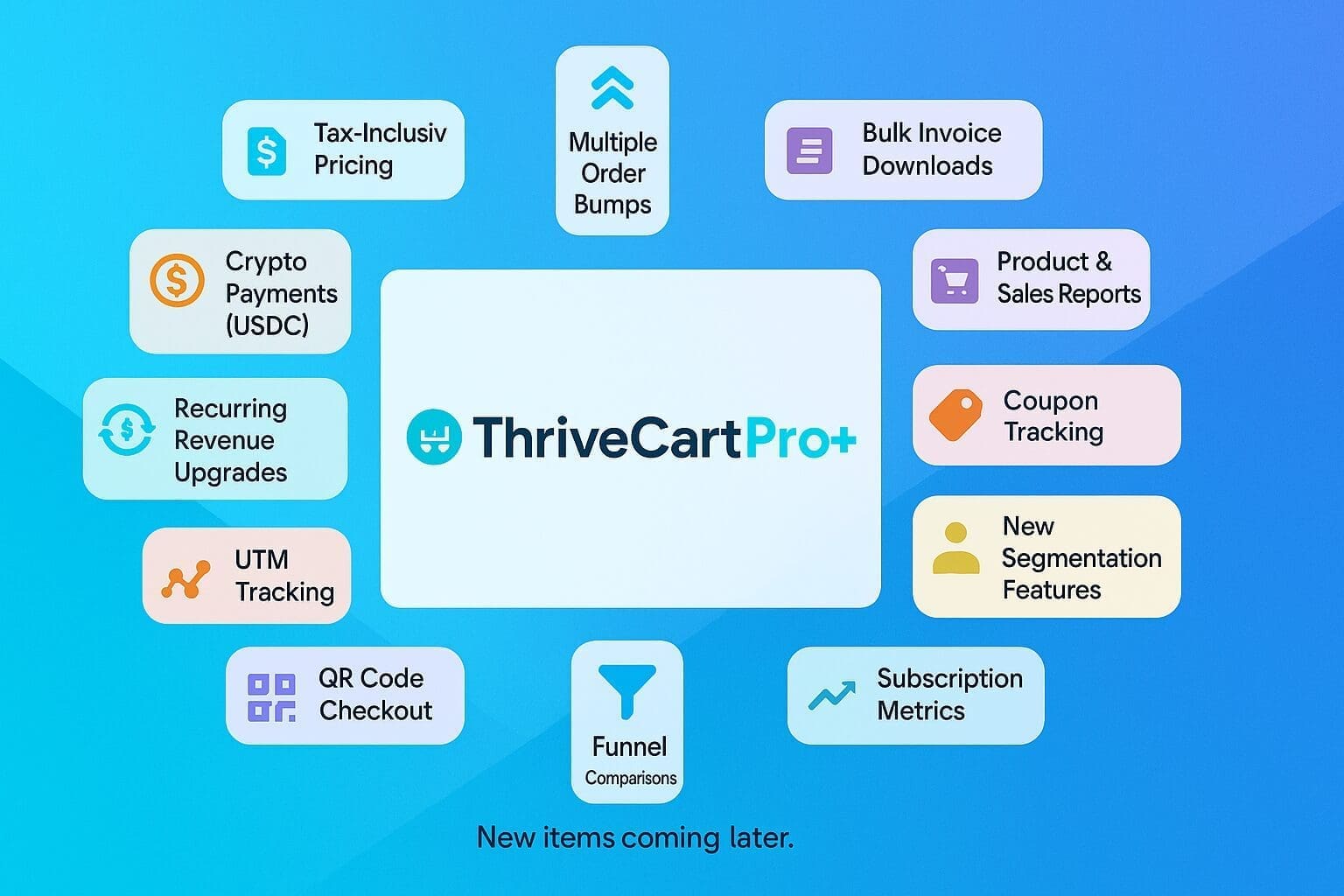
It is now live! ThriveCart Pro+ (read Pro Plus)
Selling online can feel like juggling flaming torches while riding a unicycle. You're trying to attract customers, showcase your amazing offers, and create a smooth checkout experience, all while keeping your sanity. If you're like many of my clients, you're a busy small business owner, teacher, coach, or learning and development professional. You're awesome at what you do, but the tech side of things can feel overwhelming. Are you tired of feeling overwhelmed by tech and losing sales because of a clunky checkout process?
That's where ThriveCart comes in.
As I mentioned in my previous review, "Is ThriveCart the Best Cart and Funnel Platform For Your Business?" , I'm a big fan of ThriveCart's power as a sales funnel platform. I use ThriveCart for my own business and to manage my clients' online sales, so I've seen firsthand how it can simplify the sales process and boost revenue.
And now, ThriveCart has just leveled up in a major way with the launch of ThriveCart Pro+ and Stripe Connect+. (Note that "Pro+" is an upgrade from "Pro".) This update is designed to simplify the sales process, boost your revenue, and give you back some of that precious sanity.
In this blog post, I'll walk you through the key features and benefits of ThriveCart Pro plus, with a friendly and easy-to-understand approach. We'll also cover the important details about upgrading for current ThriveCart users.

Disclosure: This post contains affiliate links. If you purchase ThriveCart Pro+ through my link, I may earn a commission, at no extra cost to you. I use ThriveCart for my business and my clients' businesses, and I highly recommend it.
Quick links:
Get ThriveCart Standard (new purchase)
Get ThriveCart Pro+ (new purchase)
Upgrade from ThriveCart Standard to Pro+ (existing ThriveCart owners)
Upgrade from ThriveCart Pro to Pro+ (existing ThriveCart owners)
ThriveCart: Standard, Pro, Pro plus, and Learn - What's the Difference?
Before we dive into Pro plus, let's quickly clarify the different ThriveCart offerings:
- ThriveCart Standard:
This is the foundation, providing essential cart and checkout functionality.
(One-time purchase) - ThriveCart Pro:
This version adds powerful features to help you maximize sales.
(No longer available to purchase, replaced by Pro+) - ThriveCart Pro+ (Pro plus):
The latest upgrade announced on April 22, 2025, Pro+ takes things to the next level with features like multiple order bumps, tax-inclusive pricing, recurring revenue upgrades and more (which we'll explore in detail below).
($295/yr) - ThriveCart Learn:
This is ThriveCart's learning management system (LMS) for hosting and selling online courses. While Learn is fantastic, it's not part of the Pro+ update, so we won't be covering it in this post.
(Included in ThriveCart core, with optional Learn+ upgrade)
Current ThriveCart users: Upgrade to ThriveCart Pro+ here for LIFETIME access!
The Power of Multiple Order Bumps
If there's one feature that has ThriveCart users buzzing, it's multiple order bumps.
What it is:
Order bumps are add-on offers presented to customers right before they complete their purchase.
Why it matters to you:
They're incredibly effective for increasing your average order value (AOV) because customers are already in a buying mood. ThriveCart Pro+ allows for up to 6 order bumps per product, giving you more opportunities to boost revenue. This is especially important because ThriveCart is a sales funnel system, not a shopping cart system like WooCommerce or Shopify. With Pro+, you can achieve the equivalent of a small shopping cart, allowing customers to purchase multiple products or services all in one checkout. This cannot be done in ThriveCart without Pro+.
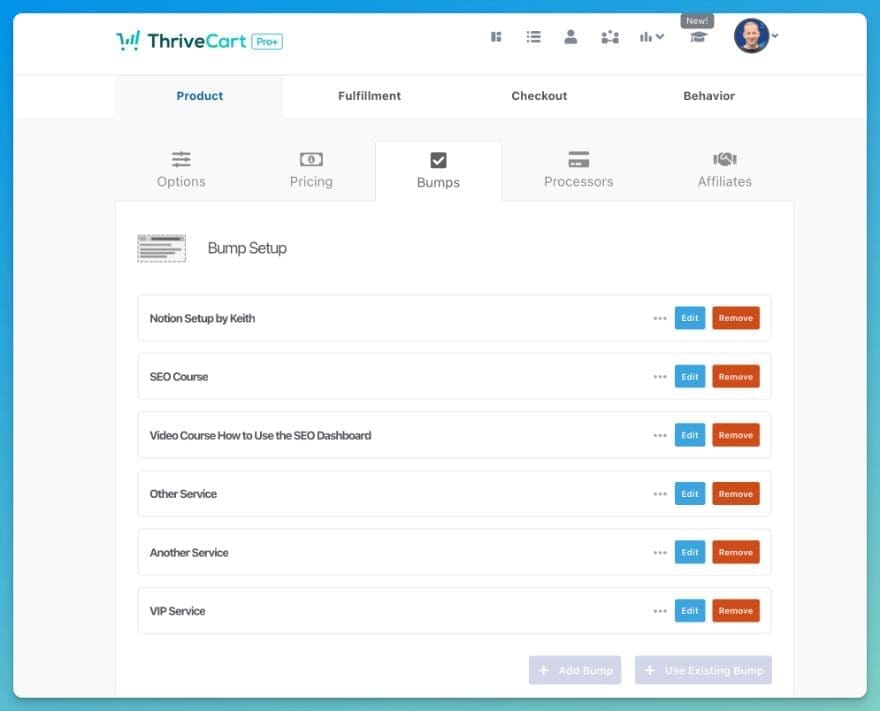
For example, imagine you're selling a membership program. With multiple order bumps, customers can also purchase a low-cost eBook, book a coaching call, or even a package of 3 coaching calls – all on the same checkout page!
If you sell online courses, you could offer a related workbook, a live Q&A session, or access to a private community as order bumps - right on the same checkout page.
ThriveCart Pro+ allows you to showcase a wider range of complementary products or services, providing more value and choice to your customers. This helps you create a smooth and clear path to purchase, build trust, and make your customers feel like they're getting a great deal.
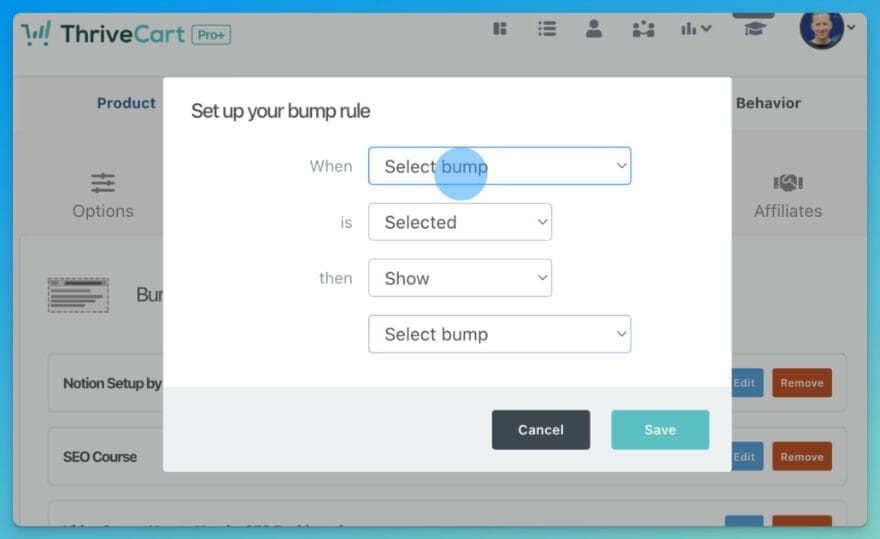
ThriveCart Pro+ also makes managing order bumps easier with:
- Copying bumps: Save time by easily replicating bumps across different products.
- Conditional logic: Show or hide bumps based on customer selections, ensuring relevance (using bump rules).
- Scroll feature: Provide a seamless browsing experience for customers viewing multiple bumps.
Key Features to help Skyrocket Your Sales
ThriveCart Pro plus is packed with features designed to boost your sales and improve the customer experience. Let's take a closer look at a few more highlights:
Recurring Revenue Upgrades (automatic subscription cancellation)
What it is:
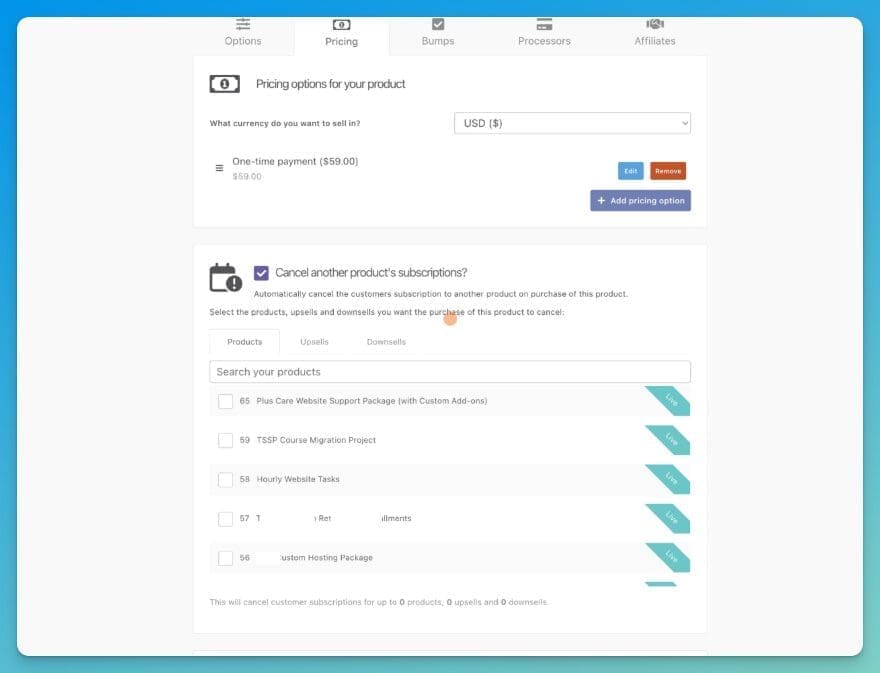
ThriveCart Pro+ introduces a powerful enhancement to subscription management: Recurring Revenue Upgrades. This feature simplifies the process of transitioning customers between different subscription tiers, such as upgrading from a 'Silver' to a 'Gold' membership.
Why it matters to you:
Until now, if someone wanted to upgrade (or downgrade) from one subscription level to another, you would have to manual cancel their subscription, have them sign up on the new subscription. It's a pain for the business owner as well as the customer - and you have to hope they follow through with the new subscription after you cancel the original one.
Instead of requiring manual cancellation and new subscriptions, ThriveCart Pro+ can automatically cancel the old subscription while seamlessly initiating the new one for your. This streamlined approach not only saves you time and reduces administrative overhead but also creates a smoother, more professional experience for your customers, minimizing potential disruptions in their access to your products or services.
For businesses that offer tiered memberships or subscription-based services, Recurring Revenue Upgrades is a game-changer. It automates the often-cumbersome process of handling subscription changes, ensuring that customers can easily move between plans. This is particularly valuable for increasing customer lifetime value, as it encourages upgrades and reduces churn. By simplifying the upgrade process, you make it more attractive for customers to invest in higher-value offerings, ultimately boosting your recurring revenue and overall profitability."
Streamlined Checkouts with QR Code Checkout
What it is:
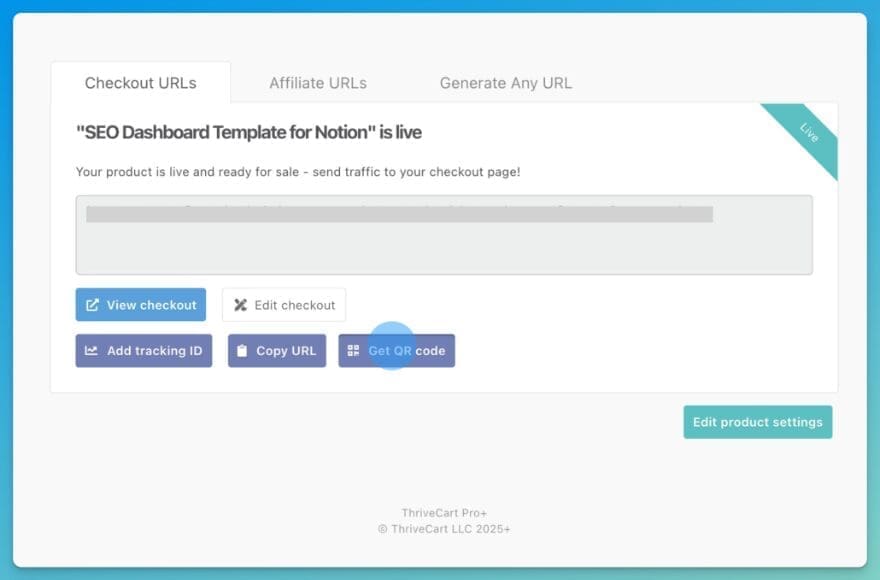
QR code checkouts allow customers to purchase your products or services by scanning a QR code with their smartphone.

Why it matters to you:
This feature offers incredible convenience, making it perfect for live events, webinars, online presentations, and demos. It simplifies the purchasing process and aligns with the growing trend of QR code usage in e-commerce (used by 65% of e-commerce businesses!). Imagine effortlessly capturing sales at your next workshop or webinar with a quick QR code scan.
Seamless Integration and Tracking
ThriveCart Pro+ is designed to work seamlessly with your existing setup.
What you get:
- Template Compatibility: Pro+ fully supports ThriveCart's Legacy and Enhanced templates.
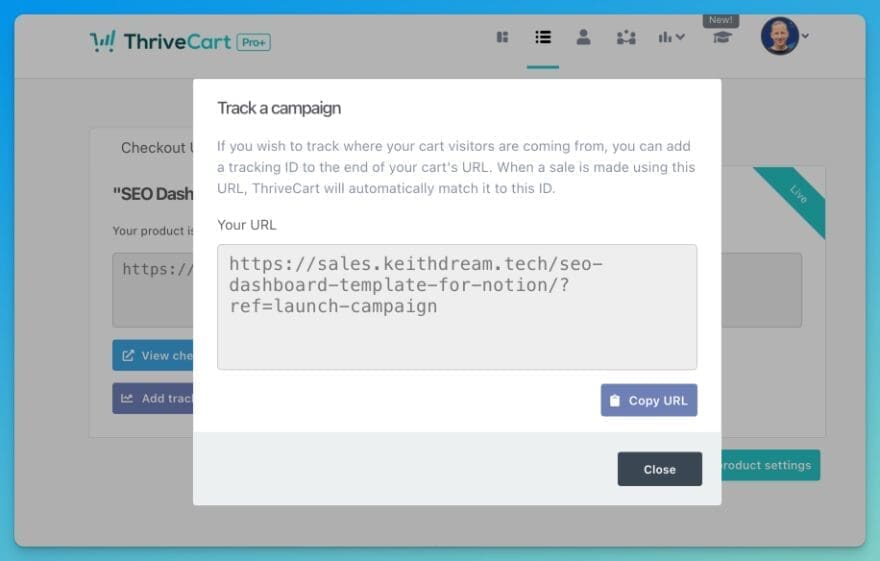
- UTM Tracking: Track your traffic source, channel, campaign, content, and keywords.
Why it matters to you:
- Template Compatibility: You don't have to rebuild your landing pages, funnels, or checkouts, saving you time and hassle. As someone who helps clients with their websites, I know how important this is. We often duplicate working products right in the ThriveCart dashboard to quickly create new sales pages and checkouts.
- UTM Tracking: * NEW * Finally understand which marketing strategies are actually driving sales, so you can stop wasting time and money on what's not working. Accurately measure your ROI and optimize your strategies for better results.
Which UTM parameters are supported?
ThriveCart Pro+ supports the five standard UTM tags:
- Campaign
- Content
- Source
- Term
- Medium
When a customer visits your hosted or embedded checkout page, if it has UTM parameters in the URL, those tags are automatically tied to their order on the backend. From there, you can filter your reporting by any of the tags above to evaluate campaign performance. All GDPR compliant.
The Sources reporting page also shows you which terms are driving the most orders and revenue—making it easy for you to find out what works and concentrate your efforts.
We can also embed checkouts directly into a web page (even with WordPress page builders like Divi and Elementor or other systems like SquareSpace or Wix).
Important Information for Current ThriveCart Users
If you're already a ThriveCart user, you're probably wondering how this update affects you. Let's clear things up:
ThriveCart Pro+ Pricing and Upgrade Options
I already purchased ThriveCart, how much will it cost me to upgrade to ThriveCart Pro+?
New ThriveCart Pro+ is priced at $295 per year.
ThriveCart Pro as we knew it has been completely replaced by Pro+. ThriveCart Standard remains as the base product.
Why it matters to you:
This information helps you understand the costs and upgrade paths, allowing you to make informed decisions about your ThriveCart account.
I know investing in new software can feel risky, but ThriveCart Pro+ is backed by ThriveCart's excellent support, and I'm here to help you get set up too.
Got ThriveCart Standard and ready to upgrade? Get ThriveCart Pro+ here.
- ThriveCart Standard: $495 one-time fee (Lifetime Access)
- ThriveCart Pro+: $295/yr
How to Upgrade to ThriveCart Pro+ (Quick Guide)
- Get Started with ThriveCart by following my easy to follow instructions, including how to upgrade to ThriveCart Pro+.
- If you are already have ThriveCart Pro, log in to your account and you will be prompted to upgrade to Pro+.
- Create an integration with Stripe to get access to Stripe Connect+ features.
- Navigate to: Settings > Integrations > Stripe Connect+
- Note: Even if you already have a Stripe account, you will need to create a new sub-account using the same email address.
- Enable Pro+ features
- Click the teal "Upgrade all your products to Stripe Connect+" button at the bottom right of your ThriveCart dashboard, then follow the prompts to enable Stripe Connect+ across all your products.
- Alternatively, upgrade select products one at a time to test functionality.
That's it!
What is Stripe Connect+?
A note about Stripe Connect+. In order to add the new functionality available in Pro+, ThriveCart and Stripe worked together to create this new custom API connection. This is why you need a new sub-account in your Stripe Dashboard.
Your new Stripe Connect+ sub-account will remain separate from your existing Stripe account. Subscribers tied to your previous setup will not automatically be migrated or merged into the new Connect+ account.
This means you’ll manage:
- Existing subscribers through your original Stripe account (In your ThriveCart products, these show up as Stripe Legacy or Stripe Enhanced)
- New subscribers processed via Connect+ through your new sub-account
However, all reporting in ThriveCart will be merged together.
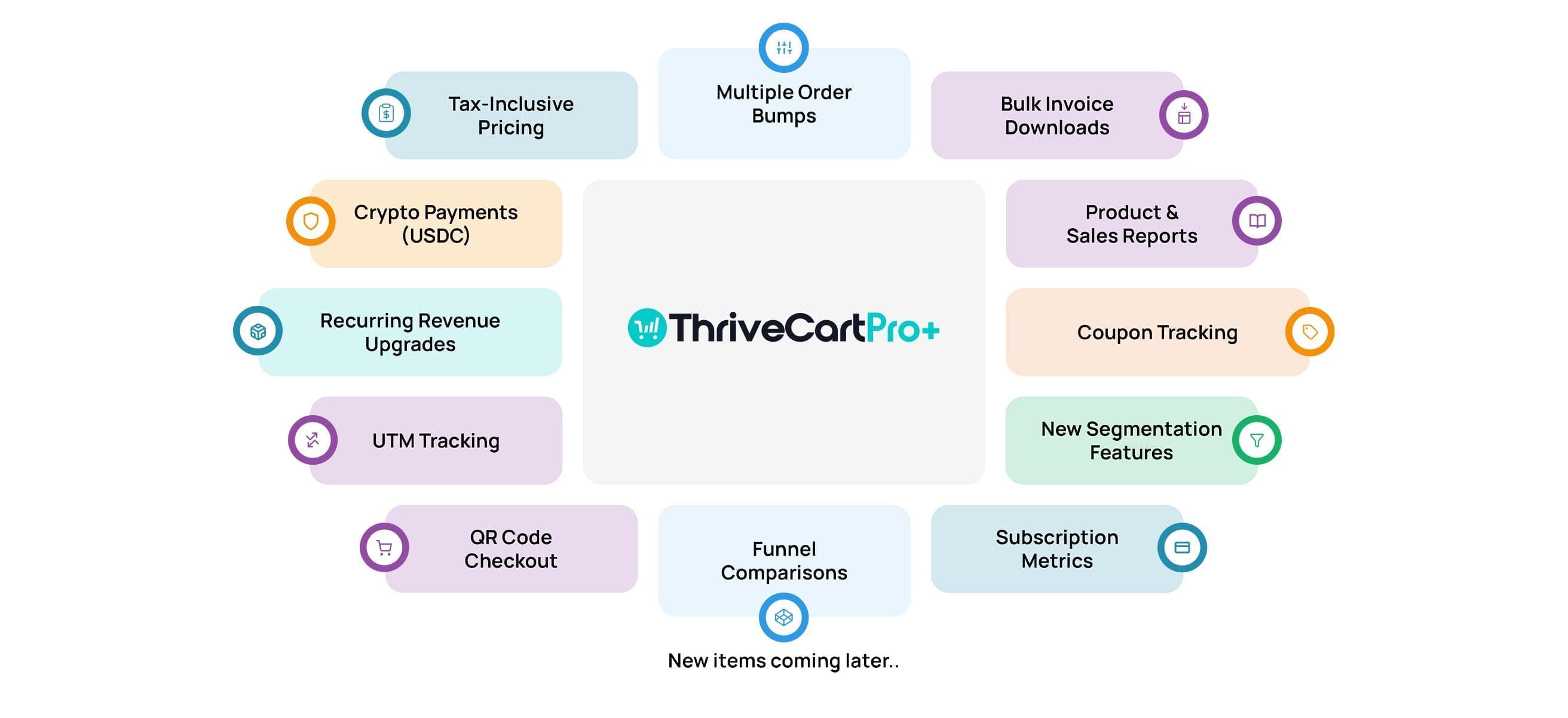
All the New and Updated Features (Quick Guide)
For a quick overview, here's a list of the key new and updated features in ThriveCart Pro plus:
- Multiple Order Bumps (up to 6 per product)
- Tax-Inclusive Pricing
- New Reporting with enhanced BI tools and visual dashboards
- Crypto Payments in USDC
- QR Code Checkout
- Bulk Invoice Downloads
- Recurring Revenue Upgrades
- UTM Tracking
- Template Compatibility
- Stripe Connect+ Integration
- Flexible Payments (100+ payment methods)
- Enhanced Security
Upgrade from Standard to ThriveCart Pro - Is it Worth It?
If you are still on ThriveCart Standard and wondering whether you should make the upgrade, here is a list of the features you get in Pro in addition to all the new functionality in Pro+
What it is: Here are the features you receive when you upgrade to ThriveCart Pro:
- Powerful Affiliate Center
- Subscription Saver Functionality (Dunning)
- Simple Sales Tax Functionality
- Intelligent Business Projections
- JV Contracts
- Advanced User Management
- Client Usage Rights
- Custom domain name functionality
Why it matters to you: These features provide you with the tools to manage affiliates, recover lost subscriptions, simplify sales tax, make better business decisions, and much more! Plus, ThriveCart offers a one-time payment model, unlike competitors like SamCart, which charges monthly fees. This can save you a significant amount of money in the long run.
Why ThriveCart Pro+ is a Must-Have
ThriveCart Pro+ isn't just an upgrade; it's a game-changer. It's designed to help you:
Key Features:
- Boost your revenue
- Streamline your sales process
- Gain valuable insights
- Save time and effort
Why it matters to you:
- Finally hit those income goals with the new features.
- Create a seamless buying experience that gives your customers options during checkout.
- Take control of your business with powerful data and automation.
- Get all the new features of Stripe Connect+.
- Sales pages and checkouts live directly on ThriveCart's servers. This means less worry about costly server resources and compliance with regulations like PCI. Even if your website is unavailable, the sales page, sales funnel, and checkout system continue to work as usual. You just create a CTA button on your website or email campaign that links to the sales page. We even have a dedicated domain to use with ThriveCart Pro (like https://sales.keithdream.tech/), which points to the ThriveCart servers.
- You also don't have to add WooCommerce or any Stripe or PayPal embeds on your website to sell something. It simplifies the whole process.
Take Your Business to the Next Level with ThriveCart Pro plus
Quick links:
Get ThriveCart Standard (new purchase)
Get ThriveCart Pro+ (new purchase)
Upgrade from ThriveCart Standard to Pro+ (existing ThriveCart owners)
Finally! Upgrade and Downgrade ThriveCart Subscriptions automatically
Don't miss out on this opportunity to transform your online sales and grow your business.
As a bonus, anyone that purchases using my links will get a quickstart checklist to speed up their setup after purchase. It will be sent directly to the email you purchased with. If you didn't get it, just email support@keithdream.tech with a copy of your receipt and I'll send it off to you.
And if you need any help setting up or managing your ThriveCart account, I'm here to assist you. We offer ThriveCart management and support services to help you make the most of this powerful platform. Book a Quick Call to see if we're a good fit.





0 Comments