
Have you ever wanted to change which content is shown on a post or page, based on a form selection such as a dropbox, radio button or checklist?
This can be done fairly easily with the free Forminator Pro plugin by WPMUDEV. That's right, it's the only completely free Pro WordPress form plugin that I know of out there.
Working Example
Here's a working example of how to use conditional formatting to change the images and text that show up when you make a selection on the form.
Forminator Settings
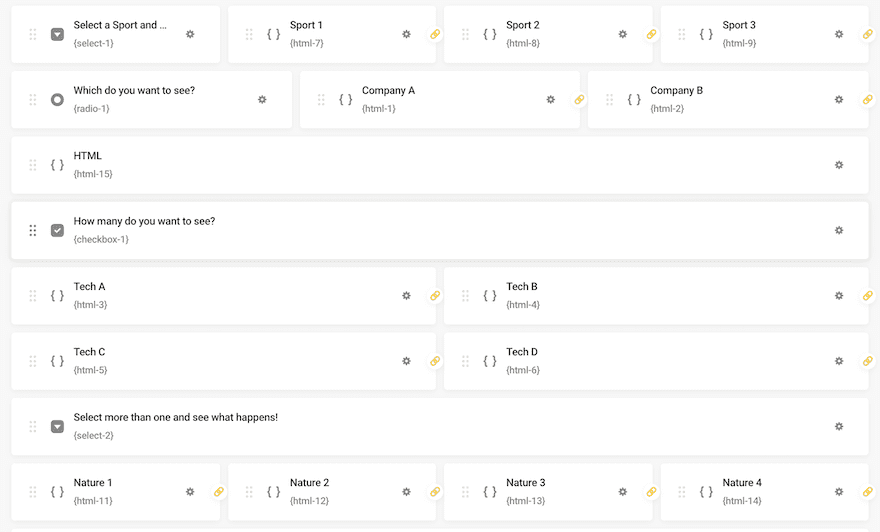
Step by Step Instructions
We'll go over the exact instructions (COMING SOON)
For starters, add a "select", "checkbox" or "radio" field and set your options.
Next add an "HTML" field for each option you want to show or hide when selected and unselected.
In the "Visibility" tab, click "Rules". Then choose the field you created in the select type above. Match the option in the select type to the option in the HTML field.
Repeat for each one, then save.
Add your forminator shortcode to the page, save and view your wonderful new dynamic content selection form!
Disclosure: Please note that some of the links above are affiliate links, and at no additional cost to you, I will earn a commission if you decide to make a purchase after clicking through the link. Please understand that I have experienced all of these companies, and I recommend them because they are helpful and useful, not because of the small commissions I make if you decide to buy something through my links. Please do not spend any money on these products unless you feel you need them or that they will help you achieve your goals.







0 Comments